Static vs Dynamic QR Codes: Which One Should You Use?
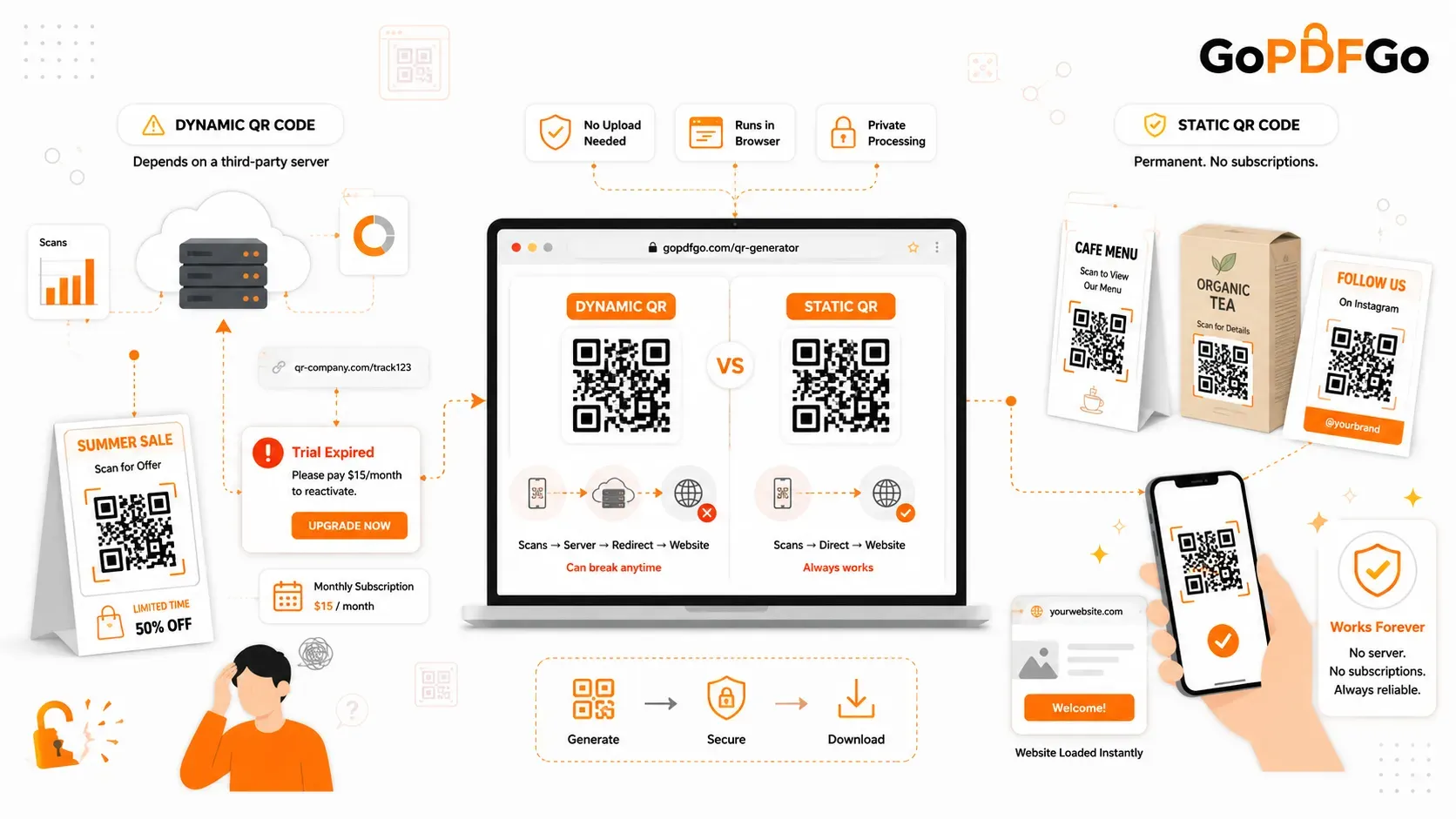
So, you want to make a QR code for your business. Maybe for a restaurant menu, a wedding invitation, or a flyer. You go online, generate one, and print 1,000 copies. Two weeks later, you scan it, and instead of your website, a page pops up saying: "Trial Expired. Please pay $15/month to reactivate."
This happens to thousands of small business owners every day. Why? Because they didn't know the difference between a Static QR Code and a Dynamic QR Code.
To your phone camera, they look exactly the same. But behind the scenes, they work entirely differently. Let's break down exactly which one you actually need, and how to avoid getting scammed by hidden subscription fees.
The Trap of Dynamic QR Codes
When you create a Dynamic code, the barcode doesn't actually contain your website link. Instead, it holds a short "tracking link" (something like qr-company.com/track123). When someone scans it, they visit the company's server first, and then the server redirects them to your website.
Because the company controls that middle server, they can track analytics (like where and when the scan happened). But here is the catch: because they control the server, they can turn it off anytime. Once your "free trial" ends, they block the redirect. Every flyer or business card you printed is now useless unless you keep paying their monthly fee.
The Permanent Solution: Static QR Codes
A Static code is completely different. The actual text or link—your real website URL—is physically drawn into those little black and white squares. There is no middleman server. There is no redirect.
Because the data is hardcoded right into the image, a static code is 100% free and will work forever. You can print it today, and as long as your website exists in 20 years, it will still scan perfectly. The only downside? Since it's permanent, if you make a spelling mistake in your link, you can't edit it later.
Step-by-Step: How to Make a Safe, Free Code
If you want a QR code that never expires, here is how you create one safely without handing your data over to tracking companies:
- Step 1: Get Your Final Link Ready. Decide exactly where you want to send people. Is it your Instagram page, a direct WhatsApp chat, or a WiFi network? Copy the exact link.
- Step 2: Use a Zero-Upload Generator. Open an offline-ready QR code creator. Using a secure platform means your destination link isn't being saved to a marketer's database.
- Step 3: Paste and Verify. Paste your link carefully and double-check for typos. Remember, static codes are forever, so a broken link ruins the whole image.
- Step 4: Download and Test. Click generate. Before you send it to a printer, always take out your own phone and scan the screen to make sure it opens the right page!
How to Prep Your Code for Printing
If you are designing a big banner or a digital catalog, you might need to adjust your files. If the downloaded image is too heavy for your design software, shrink the picture file size safely right in your browser. Or, if you want to attach the new code to the last page of your company brochure, just combine the document and the image together without any server uploads.
Frequently Asked Questions (FAQ)
Q: Can QR codes be hacked or hijacked?
A: A static QR code cannot be "hacked" remotely because it is just a printed image. The only way to hijack it is if someone physically places a sticker of a different QR code over yours. However, dynamic codes can break if the hosting company gets hacked.
Q: How far away can someone scan my printed code?
A: It depends entirely on the size of the print. The general rule of thumb is a 10:1 ratio. If you want people to scan it from 100 inches (about 8 feet) away, the printed barcode needs to be at least 10 inches wide.
Q: Will my code still scan if the paper gets scratched or torn?
A: Usually, yes! QR codes have a built-in feature called "Error Correction." Depending on the setting, up to 30% of the barcode can be damaged, dirty, or covered up, and your phone will still be able to read the remaining squares perfectly.
Q: Do QR codes work if the customer has no internet?
A: It depends on the content. If the code links to a website, they need the internet to load the page. But if the code just contains plain text (like a WiFi password or a phone number), the phone camera will read and display it even in airplane mode.
Take Control of Your Links
Don't fall into the subscription trap for something that should be free. Create your permanent, static QR codes today and print your marketing materials with total peace of mind.