How to Create a PDF Product Catalog from Photos for WhatsApp Sharing
If you run a small business, a boutique, a home bakery, or a wholesale shop, WhatsApp is likely your primary sales channel. When a potential customer messages you asking for your latest collection, pricing, or product variations, what is your immediate reaction?
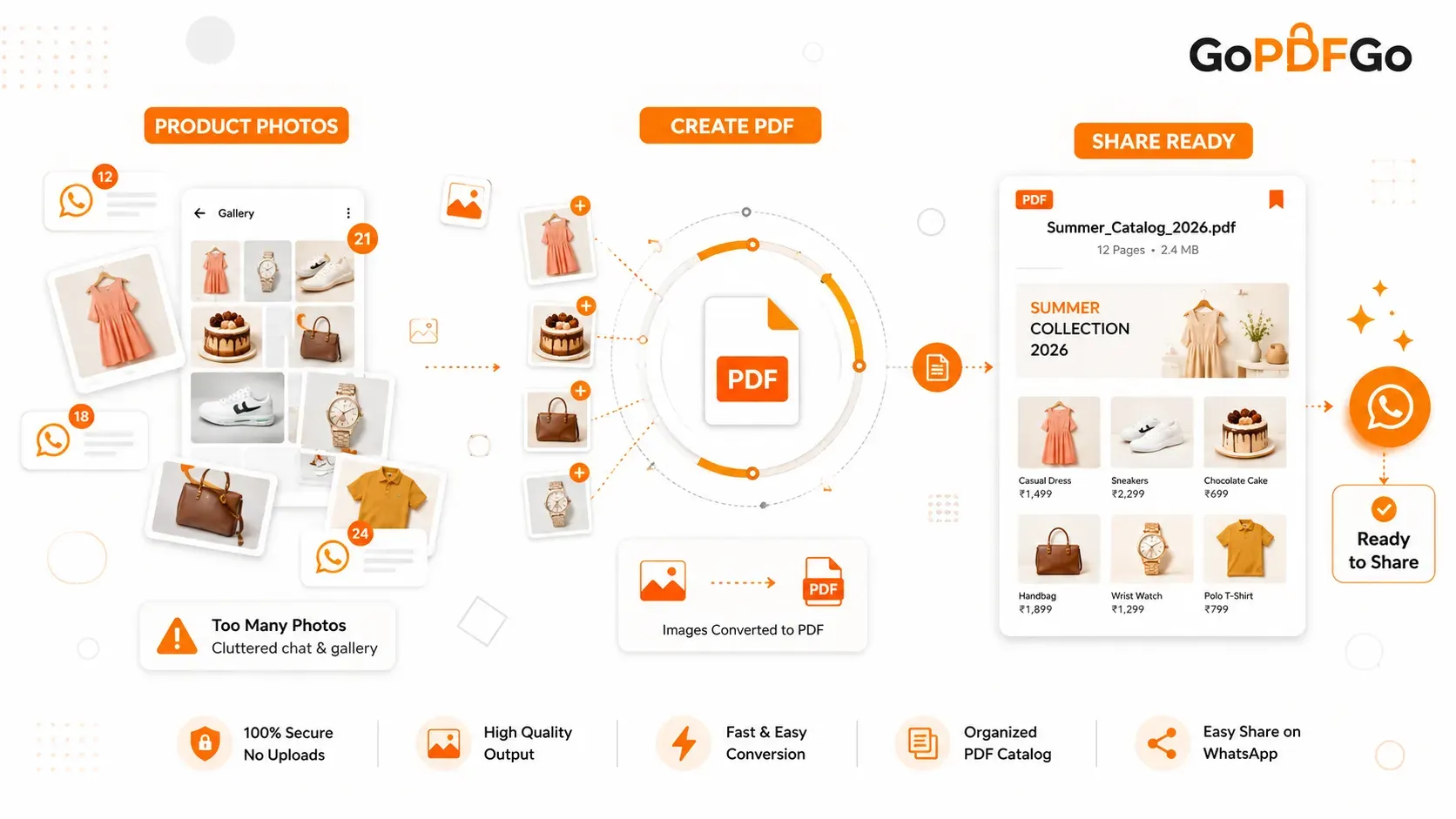
Most business owners quickly open their phone gallery, select 20 or 30 different product photos, and hit send. The customer’s phone violently vibrates 30 times in a row, their personal gallery gets cluttered with random downloaded images, and finding the specific prices or descriptions becomes a chaotic mess. Even worse, WhatsApp automatically applies heavy background compression to individual photos, making your beautiful products look blurry and cheap.
To create a PDF catalog for WhatsApp, use a secure Image to PDF tool to combine your individual product photos into a single, scrollable document. This prevents gallery clutter, maintains high image quality, and provides a professional shopping experience for your customers.
Why a PDF Beats a Pile of Loose Photos
There is a significantly better, more professional way to showcase your inventory: The PDF Product Catalog. Converting your product images into a single document instantly upgrades your brand's professional image. Here is why your customers will absolutely love it:
- One File, One Download: Instead of downloading 30 individual images, the customer downloads one neat, organized file named "Summer_Collection_2026.pdf".
- Perfect Presentation: A PDF acts like a digital magazine. The customer can smoothly scroll through your products one by one, exactly in the sequence and order you designed.
- No Gallery Clutter: PDF files save directly to the document folder on a smartphone, meaning they won't mess up your customer's personal photo gallery with screenshots and product snaps.
- Forward-Friendly for Referrals: If a customer wants to show your catalog to a friend or family member, forwarding a single PDF is infinitely easier than selecting and forwarding dozens of separate images.
How to Build Your Digital Catalog for Free
You don't need to hire a freelance graphic designer or buy expensive, complicated catalog-making software. If you have the product photos ready on your smartphone or laptop, you can create a PDF catalog in under two minutes using our web-based platform.
Step-by-Step WhatsApp Catalog Creation:
Because our tools run completely locally in your browser, your proprietary wholesale prices and unreleased product photos are never uploaded to external servers, ensuring absolute business privacy.
- Step 1: Prep Your Photos. Edit your product photos for brightness. If you want to add text (like price, sizes, or SKU numbers), use your phone's basic photo editor to type it directly onto the image before compiling.
- Step 2: Access the Tool. Open the Image to PDF tool on GoPDFGo. You can do this effortlessly right from your mobile browser without installing any heavy apps.
- Step 3: Upload and Sequence. Select all your prepared product photos. Once they load, drag and drop the visual thumbnails to arrange your catalog. Pro Tip: Put your best-selling or most visually striking product as the very first image to act as an eye-catching "Cover Page".
- Step 4: Convert to PDF. Click the convert button. The local processing engine will instantly stitch the images together into a clean, seamless PDF document ready for sharing.
Optimizing for Fast WhatsApp Delivery
Before you blast this new catalog to your entire broadcast list or upload it to your WhatsApp Business profile, you must check the total file size. If your catalog is 15MB or 20MB, it will take too long for customers on slow mobile data networks to download it, causing them to lose interest and abandon the sale.
To ensure lightning-fast downloads, run your newly created catalog through our Compress PDF utility. Our smart compressor shrinks the file as much as it safely can while keeping your product images looking clean — it tries a lossless pass first and never hands you back a file bigger than the original. Your catalog will load instantly, look highly professional, and undoubtedly help you close more sales.
Frequently Asked Questions (FAQ)
Q: Will converting images to PDF reduce my product photo quality?
A: No. Unlike WhatsApp, which aggressively compresses photos sent in chat, converting your images into a PDF container preserves their original resolution and clarity.
Q: Can I add or remove products later?
A: Yes! If a product goes out of stock, you don't need to remake the whole catalog from scratch. Just open our Delete PDF Pages tool, tap that one page, and download the trimmed catalog — every other page stays exactly as it was.
Group and Order Products Like a Real Shop
A catalog that opens with a kurta, then a phone cover, then back to a kurta makes the customer work too hard. They scroll, lose their place, and ask you the same question they could have answered themselves. Treat the catalog like the aisles in your shop. Keep one category together before you move to the next.
For a clothing reseller that usually means sarees first, then suits, then dupattas. For a kirana or hardware setup it's by use. A simple order that almost always works:
- Bestsellers up top. The fast-moving items go on the first two or three pages. Most people never scroll to the end.
- Same category stays together. All red sarees, then all blue, instead of jumping shades.
- Cheap to costly, within a group. Customers anchor on the first price they see, so start affordable and let them climb.
- Out-of-stock at the back, if you must keep them at all.
Drag the thumbnails into this order before you hit convert. Two minutes of arranging saves you fifty "bhaiya iska rate kya hai" messages later.
Add the Price and SKU So Nobody Has to Ask
A photo with no price is a half-finished catalog. The customer likes the third saree, but now they have to type and wait, and half of them just drop off instead. Burn the price straight onto the image. Open your phone's gallery editor, add a small text box in a corner with the rate and a short code, something like SR-214 Rs 899, and keep that corner consistent on every photo.
The SKU isn't for the customer, it's for you. When someone screenshots page 7 and says "this one," a code beats describing "the greenish one with the border" across forty lookalikes. If your photos came out dark or a little tight in frame, fix that first with Crop to cut dead edges, then compile. Clean, readable, priced. That's the whole job.
Make It Behave on WhatsApp Business
On WhatsApp Business, a PDF shows up as a tidy document card with your filename and a page count, not a wall of thumbnails. So the filename is doing real marketing. RaviTextiles_Diwali_2026.pdf reads far better in a forward than doc_20260608.pdf. When an aunty forwards your catalog to her sister's WhatsApp group, that name is the first thing forty strangers see.
Two things to respect. WhatsApp now allows documents up to 2GB, but the real enemy is a customer on a patchy 4G connection in a small town. A 25MB catalog that spins forever gets abandoned before it opens. Keep it lean. And a light touch of branding goes a long way: make the very first image a proper cover with your shop name, area, and number, so even a screenshot of page one tells a new buyer who to call.
Refresh It When Stock Changes, Don't Rebuild It
Stock moves every week, and nobody has the patience to remake the whole file each time. The trick is to edit, not restart. When new arrivals come in, run a quick Image to PDF of just the fresh photos, then Merge PDF them onto your existing catalog so the old pages stay untouched. Put the new stuff at the front and people instantly see what's new.
Bump the date in the filename every time you send an updated version, like _June to _July, so old screenshots floating around in group chats don't confuse buyers about which rates are current. One source file, small edits, always fresh. That's how a catalog earns its keep instead of becoming a chore.
Stop spamming your clients with dozens of loose images. Use our free, local tools to create a PDF catalog today and give your small business the professional upgrade it deserves.