How to Make a QR Code for Your Restaurant Menu (No Monthly Fees)
Walk into any half-decent cafe in India now and there is a little sticker on the table. You scan it, the menu opens on your phone, the waiter doesn't have to wipe down laminated cards all day. The owner, though, is usually paying for that sticker. Quietly, every single month.
A lot of those "menu QR" services run on a subscription. You pay 300, 500, sometimes 800 rupees a month, and in return they host your menu and hand you a code. Stop paying and the code goes dead. For a busy restaurant that might be fine. For a small dhaba, a one-person cloud kitchen, or a tiffin service taking orders on WhatsApp, it is a recurring bill for something you can set up yourself in twenty minutes. I want to focus on the one part of this that nobody explains properly: how to change your menu later without reprinting a thing.
Why the subscription even exists
A QR code is just a picture that holds some text. Scan it, your phone reads the text, and if that text is a web link, the phone opens it. That is the entire mechanism. The subscription apps slip a redirect into the middle: their code points to their server first, which then bounces you to your menu. They own that middle step, so they can switch it off the day your payment fails. A code that has your real link built straight into the squares has no middleman and no off-switch. If you want the full static-versus-dynamic breakdown, our piece on static and dynamic QR codes covers it. For our purposes, one line is enough: keep the link inside the code, and there is no one left to bill you.
Get your menu into one PDF and keep it light
Your menu lives as either nice photos of a printed card, or a design file from whoever did your branding. The goal is the same: one PDF, not five loose images, so a customer at the table scrolls through everything in a single go.
If it is photos, shoot them flat and straight first, then combine the shots into one document with Image to PDF, dragging them into the order you want. Pages came out jumbled? Fix the sequence with Rearrange PDF. Already have a separate food card and beverage card as two PDFs? Stitch them with Merge PDF. That is the boring part, and it is genuinely two minutes of work.
The step people skip is weight, and it bites you exactly where it hurts. Your customer might be on patchy 4G inside the cafe, or out on the highway at a dhaba where the signal drops every few seconds. An 8MB file of high-resolution food photos will just sit there spinning, and they give up and call the waiter anyway. Push the file through Compress PDF and get it to a few hundred KB. The text stays sharp, the dish photos still look good on a phone, and it opens almost instantly even on a weak connection. A menu that loads fast is a menu people actually read.
Put it online and grab the link
The QR needs a public address to point at. Two quick routes. On Google Drive, upload the PDF, right-click it, choose Share, and switch access to "Anyone with the link," then copy that link. If you have a website, upload the PDF there and use the direct address, something like yourcafe.in/menu.pdf, which looks more trustworthy because it is yours. Either way, open the link in an incognito tab before moving on. If the menu loads with no login wall, you are set. (Drive that stays private throws customers a "request access" screen, and they walk away.)
Make the QR code
Take that public link and feed it to a generator that doesn't lock you into anything.
Make Your Free Menu QR Code
- Step 1: Copy the public link to your menu PDF, then open it once yourself to confirm it loads cleanly with no login.
- Step 2: Open the QR Code Generator and pick the text/URL mode.
- Step 3: Paste your link into the box. Check it twice for a missing letter or a stray space, because a static code can't be edited once it is printed.
- Step 4: Generate the code, then scan it off your own screen with your phone and make sure the menu actually opens.
- Step 5: Download the image and send it to print. A 10-rupee print at the Xerox shop does the job for a tabletop card; for the counter or outdoors, get it on a small flex or a laminated stand.
No account, no card details, no monthly anything. The link lives inside the code for good.
The whole point: change the menu, keep the same QR
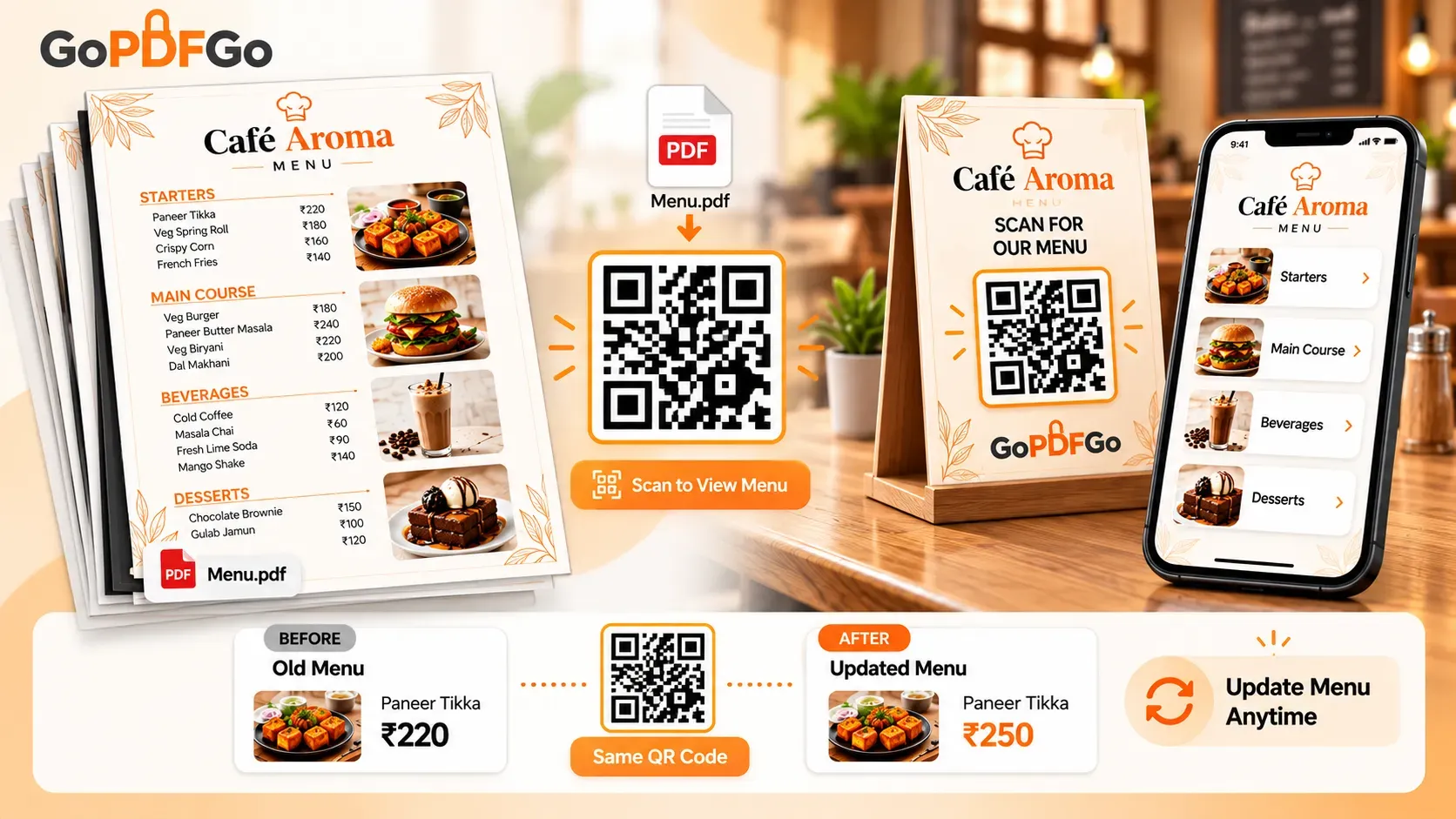
This is the bit the subscription apps want you to believe is hard, and it is the real reason to read this rather than just any QR guide. Your code points to a link, not to the file sitting behind it. So when you raise the price of the paneer or add a summer shake, you do not generate a new code and reprint every table card. You swap the file at the same link, and the QR on your tables is none the wiser.
How you do that depends on where the file lives:
- On Google Drive: open the existing file, go to "Manage versions," and upload the new PDF as a new version of the same file. The share link does not change one character. Do not delete the old file and upload a fresh one, because that creates a new link and breaks every printed code.
- On your own website: upload the new menu and overwrite the old file using the exact same filename, so menu.pdf stays menu.pdf at the same address.
That is the static-link trick in full. Same code on the table, updated menu behind it, and you never paid anyone to "edit" anything. The only time you ever reprint is if you move the file to a brand-new address, so pick one home for it and leave it there.
For cloud kitchens and tiffin services
No sit-down place, just WhatsApp and Instagram orders? This still fits. Print the QR on your delivery boxes and on the flyer you slip into tiffin bags, or drop it into your shop bio image. The customer scans and the menu PDF opens, so they see the full week's spread and the prices without you typing it out for the hundredth time. Want them to be able to message you straight from the scan? That is a different recipe, where the QR points at a wa.me link instead of the PDF. For just showing the menu, the PDF link is exactly right, and there is no per-scan cut going to anyone.
Frequently asked questions
Q: How do I update prices without reprinting my table cards?
A: Replace the PDF at the same link. On Drive, use "Manage versions" to upload the new file over the old one; on your website, overwrite menu.pdf with the same filename. The printed QR is untouched and instantly shows the updated menu.
Q: My menu photos make the file heavy. Will customers wait forever?
A: Run it through Compress PDF first. A few hundred KB opens almost instantly even on weak signal, which is exactly what you want at a highway dhaba or anywhere the network is patchy.
Q: Google Drive or my own website?
A: Drive is faster to set up and free. Your own website looks more professional and the address belongs to you. Have a site? Use it. If not, Drive is perfectly fine to start with.
Q: Can I combine photos and a separate drinks card into one menu?
A: Yes. Turn loose photos into a PDF with Image to PDF, then join that with any existing PDF card using Merge PDF, so customers get everything in one scroll.
You don't need to rent a QR code. You need a clean PDF, a public link, and one free generator. Build the file with Image to PDF, trim it with Compress PDF, and point the QR generator at it. Print once, update forever, pay no one.